WUF Unifies Footprints
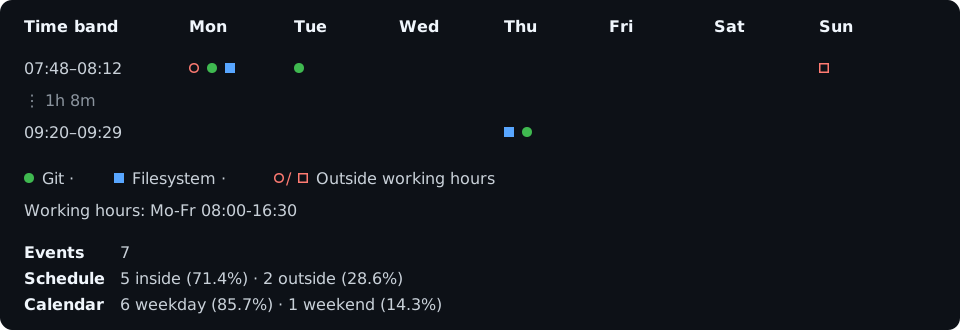
Wuf is a local terminal CLI that shows timestamp activity as a representative Monday-to-Sunday week or an exact chronological timeline. It helps answer two questions quickly:
- When did recorded activity happen?
- Which events occurred inside or outside the intended working schedule?
The output describes discrete evidence, not continuous work duration.
Install
Section titled “Install”Wuf requires Python 3.11 or newer. Git event collection also requires the local
git executable.
pip install wufwuf --helpFor an isolated environment, use uv tool install wuf or pipx install wuf.
Platform archives are published with each
GitHub release.
See the current week
Section titled “See the current week”Run Wuf inside a Git repository:
wufBy default, Wuf reads commit author timestamps reachable from local branches, selects the current ISO week in your operating system’s timezone, and compares them with Monday-Friday 08:00-16:30.
wuf -t 2w3dwuf -t 2026-W31wuf -p fswuf -p both -t 2wwuf --view timeline -t 2wwuf --hours 'Mo-Thu 08:00-16:30; Fr 08:00-14:00'Continue with Using Wuf for time selection, event profiles, exact selectors, schedules, chart controls, and configuration.
Local and honest
Section titled “Local and honest”Wuf reads local Git records and current filesystem metadata. It does not fetch, contact a hosting service, start a server, or send telemetry.
A timestamp is evidence attached to a record. It cannot prove how long someone worked, recover activity that was never logged, or reconstruct metadata that has already been replaced. Read Coverage, privacy, and accuracy for those boundaries.
Alpha status
Section titled “Alpha status”Wuf is under active development. The installed command’s --help output is the
authoritative reference for its exact options and built-in defaults.
Wuf continues the former Workfold project under its permanent name. The
transitional workfold package and command remain available, while wuf and
wuf.toml are canonical.